
Plumbing software built for urgent calls and real field work
Dispatch the closest tech to a burst pipe, capture proof on every job, handle overtime payroll, and invoice from the truck. Plumbing service software for teams of every size, configured around how you already work.
 No credit card required
For teams of 5 to 5,000
Free data migration
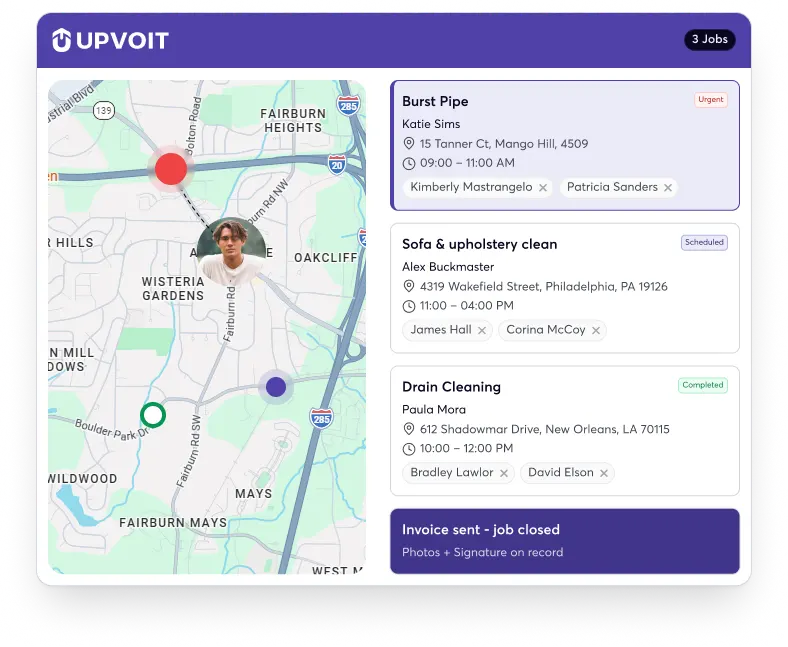
Built for how Plumbing work actually happens

Losing urgent jobs
A burst pipe won’t wait for an opening. The customer calls whoever answers first, so a slow dispatch hands the job straight to your competitor.

Schedule conflicts
A whiteboard holds up for a truck or two. Add more techs and emergency calls, and double bookings slip through before anyone catches them.

Job details vanish
Photos, notes, and approvals live across a dozen phones and trucks. Invoices go out late, and the proof is gone when a customer disputes.

Blind to the field
When the office can’t see where techs are or how each job is going, every status update turns into a call that stops the work.
Plumbing business software that runs the whole job
Plumbing field service software that simplifies operations, streamlines jobs, and keeps your entire team on track.
-

Scheduling & Dispatch

Plumbing Scheduling & Dispatch Software
Send the closest tech to the burst pipe
Upvoit’s plumbing scheduling software and plumbing dispatch software live in one screen, so you see who’s free and closest and assign an urgent job in seconds, without bumping the rest of the day.
Live technician tracking -
Invoicing & Payments
Plumbing Invoicing Software
Invoice from the truck, get paid faster
Upvoit’s plumbing invoicing software turns a finished job into an invoice on the spot, takes online payments, and syncs with QuickBooks or Xero, so billing doesn’t wait for end-of-week paperwork.
On-site invoicing -
Estimate & Proposals
Plumbing Estimating & Proposal Software
Quote on-site, approved before you leave
Build a quote with Upvoit’s plumbing estimating software, share it for approval, and capture a signature on the spot. As plumbing proposal software, it keeps every approval documented on the job.
Share for approval & e-signature -
Job & Work Order Tracking
Plumbing Job Management Software
Every job in one shared record
Upvoit’s plumbing job management software keeps work orders, notes, photos, and signatures in one place, so the office and the field see the same job history in real time.
Shared work-order history -
Proof & Custom Forms

Proof, Checklists & Custom Forms
Proof on every job, when a dispute comes
Keep important job records together with customizable forms, inspection checklists, photos, notes, and customer signatures. Your team can document completed work on-site, making it easier to review service history and handle customer questions later.
Photos, signatures & custom checklists -
Payroll & Overtime
Payroll & Overtime
Weekend and emergency hours, sorted
On-call rotations, weekend jobs, and overtime shouldn’t mean payroll headaches. Timesheets convert to payroll with your overtime and rounding rules already applied, no chasing paper timesheets after a busy week.
Overtime & rounding rules -
Mobile App
Mobile App For Plumbers
A field app the whole crew can use
Job details, notes, photos, checklists, and signatures in one app on iOS and Android, in English and Spanish, plus automatic “on my way” texts so customers aren’t left guessing.
Bilingual · iOS & Android -
Online Booking
Online Booking For Plumbing Services
Let customers book you, day or night
Add a booking widget to your website or share a booking link, and customers pick an open slot themselves. New requests land straight on your dispatch board, so after-hours calls become booked jobs instead of voicemails the next plumber picks up.
Website widget & shareable link -
Reporting
Plumbing Business Reporting
See which jobs actually make money
As plumbing business management software, Upvoit reports on job costs, technician productivity, and profitability in real time, so you know which jobs, techs, and customers actually pay, not just which keep the calendar full.
Real-time dashboards


Software that adapts to how you already work
Most plumbing software forces you into its way of doing things. Upvoit is set up around your workflow during founder-led onboarding, so an established shop with its own process doesn’t have to start over to get organized.

Custom forms & checklists
Build the job forms, inspection sheets, and completion steps your work actually needs.

Your workflows, not a template
Configure job stages, dispatch rules, and payroll rules to match how your team runs.

Founder-led onboarding & free Migration
We move your existing job history over and set the system up with you, at no extra cost.

Emergency dispatch rule
Backflow inspection form

Weekend overtime (1.5x)
Job stages: Quote → Approved → Don

Existing customer dat

Plumbing service management software that fits your tech stack
Upvoit connects to the stack you use now, so scheduling, dispatch, and invoicing stay in sync without switching platforms or entering the same job twice.
Hear From plumbing businesses Owners

“Emergency calls used to blow up the schedule for everybody. Now my dispatcher moves the planned jobs around on the calendar in a few clicks, and the techs see the change on their phones right away. Nobody pulls up to a house we already rescheduled anymore.”
David M.
Owner
“Callbacks were hurting us because the plumber on the second visit had no idea what the first one found. Job history, photos and notes are attached to the address now. He walks in already knowing about the corroded shutoff and the awkward access panel behind the tub.”
Mark T.
Service Manager
“We work with a lot of property managers, and each one wants their requests tracked on their own. Their teams submit through the portal, we dispatch from the same screen, and they can check the status without calling us. We look a lot more organized than we felt a year ago.”
Joseph R.
Operations Manager
“My guys hate paperwork, so job notes used to be three words and a smudge. The mobile app walks them through what to capture, photos included, and the report builds itself. When a homeowner questions a bill, I can show them exactly what we found in the line.”
Anthony B.
Founder
“Invoices used to get typed up at the end of the week from carbon copies, and half of them were missing a part. Techs invoice from the job now, and it syncs to QuickBooks without anyone retyping it. Our list of unpaid invoices has never been this short.”
William C.
Director of Operations
“We grew past the point where I could know every job personally. The reports show me which techs and which kinds of jobs are actually making money, in plain language I can follow. A couple of decisions I’d been putting off for months got a lot easier once I saw it laid out.”
Daniel K.
CEO
Answers to the Questions Plumbing Business Owners Ask Most
-
What is plumbing business software?
Plumbing business software helps you manage service calls, emergency repairs, plumbers, scheduling, estimates, customer information, and billing in one place. Upvoit keeps your office and field team connected, so you spend less time chasing updates and more time running your business.
-
How does plumbing scheduling software help?
When an emergency leak comes in while your plumbers are already booked, the schedule can get messy quickly. Upvoit gives you a clear view of jobs and technician availability, making it easier to adjust appointments, assign work, and keep the rest of the day moving.
-
Can Upvoit handle emergency plumbing service calls?
Burst pipes, clogged drains, and water heater failures rarely happen at convenient times. With Upvoit, you can add urgent calls, check who’s available, and assign the work while keeping track of the other appointments that may need adjusting.
-
Can Upvoit manage both service calls and plumbing projects?
From fixing a leaking faucet to handling a larger plumbing installation, you can manage different types of work in one place. Keep everyday repairs, inspections, installations, and multi-day projects organized without juggling separate systems.
-
Can plumbing contractors manage change orders with Upvoit?
Plumbing jobs don’t always go according to the original estimate. A technician might discover damaged pipes or additional work behind a wall. Upvoit helps your team document job updates and additional work so those details are easier to review and bill for.
-
Can plumbers access job details from the field?
Your plumbers can access customer information, job instructions, photos, notes, forms, and relevant service history from the field. That means less time calling the office to find out what happened on the last visit or what the customer requested.
-
Does Upvoit have a mobile app for plumbers?
Your team doesn’t need to be sitting at a desk to keep jobs updated. Plumbers can use the mobile app to access job details, review customer information, complete forms, add photos, and update work while they’re on site.
-
Can Upvoit help with plumbing estimates and quotes?
Whether you’re quoting a water heater replacement or a larger installation, Upvoit helps you create and manage estimates as part of your workflow. Keeping quotes and job details organized makes it easier to follow up and move approved work toward scheduling.
-
Can I customize Upvoit for my plumbing business?
Every plumbing business has its own way of handling service calls, installations, maintenance, and customer requests. Upvoit can be configured around your workflows, forms, job stages, and processes. If you need functionality beyond the standard setup, custom development is also available.
-
How long does it take to set up plumbing business software?
Getting started doesn’t have to turn into a months-long project. Upvoit can typically be set up within days, depending on your workflows, team size, existing data, and any custom requirements.
-
What kind of support do I get with Upvoit?
You’re not left to figure everything out on your own. Our founder-led onboarding gives you hands-on help with configuring the system, moving your existing data, and getting your team comfortable before you go live.
-
Can I move my existing customer and job data to Upvoit?
Switching software doesn’t mean starting your records from scratch. Upvoit includes free data migration, and we’ll help you move your existing customer and job information into the system so your team has the information it needs.
-
How much does plumbing business software cost?
Upvoit costs $18 per user per month when billed annually, or $20 per user per month when billed month-to-month. There’s no long-term contract, and free data migration is included.

