
Run Every Job From Schedule To Payroll, All In One Place
Upvoit brings scheduling, dispatch, field updates, and much more into one platform. It fits the way your team already works.
 14-day guided trial
Founder-led setup
Live in days
14-day guided trial
Founder-led setup
Live in days

4.7
 Ratings on G2.com

4.7
Ratings on Captera
Trusted by growing service teams across the trades


Stop running your business through spreadsheets, phone calls, and disconnected apps
Upvoit gives the office and field one live source of truth, so fewer details fall through the cracks from booking to payroll.

Scheduling chaos
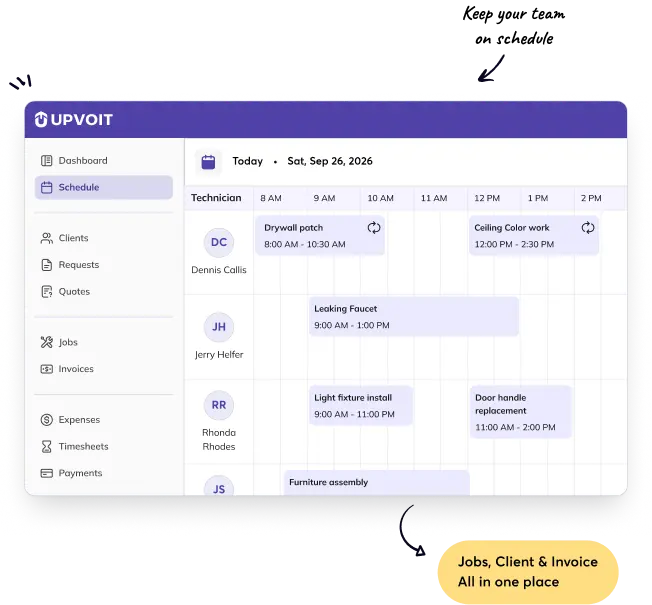
See availability, recurring work, job duration, skills, and location before assigning work.
A clearer day for dispatchers and
technicians

No field visibility
Track job status, technician location, timesheets, photos, forms, notes, and customer signatures live.
Fewer “where is the tech?” calls

Slow, inaccurate billing
Convert job details, billable time, expenses, materials, photos, and approvals into invoices faster.
Less re-entry between operations
and finance

Payroll takes too long
Apply your own rounding, overtime, breaks, allowances, and approval rules to captured field time.
A cleaner payroll review every cycle
See How Your Entire Field Service Operation Comes Together
Schedule the work. Keep track of the field. Capture proof. Get paid. See how every part of your operation connects in Upvoit, from the first assignment to the final report.
-

Schedule & dispatch
Match jobs to availability, skills, location, and capacity.

Build a schedule your team can actually follow
Drag and drop work, see capacity, and keep every assignment connected to the customer and job record.
-
Track the field
Know who is working, where jobs stand, and what changed.

Know what’s happening in the field without chasing updates
See who is working, where jobs stand, and what changed, with job and technician information connected in one place.
-
Complete with proof
Forms, checklists, photos, signatures, notes, and approvals.
Finish every job with the details that matter
Capture forms, checklists, photos, signatures, notes, and approvals while the work is happening, keeping job documentation connected to the job record.
-
Invoice & collect
Turn approved work into accurate customer invoices.
Turn completed work into invoices without the back-and-forth
Connect completed job information to invoicing, send accurate invoices, and keep billing tied to the work your team completed.
-
Report & improve
Track workload, profitability, payroll, and performance.
See where your operation is making money and where it isn’t
Track workload, profitability, payroll, and performance through reports and dashboards that give you a clearer view of your operation.


Give technicians what they need without giving them another complicated app
Technicians see the right job details, actions, forms, and customer information on mobile. Your rules determine what must be completed before a job can move forward.
One-tap clock-in and job
status
updates
Directions, customer
details, and service
history
Photos, forms, checklists,
notes, and
signatures
Time, materials, expenses,
and payment
collection
Required completion steps
and
approvals
Live updates for office
and customer
communication
Get Customization Without the Usual Cost and Wait
Most field service software makes you adapt. Upvoit adapts to you. Customize workflows, forms, payroll, and more. Need more? Built in weeks, not months.
You change to fit the software slow, expensive and rigid.
-

Months to build simple changes
Even minor customizations can take months.
-
High customization costs
Every requirement comes at a cost.
-
Fixed & rigid workflows
You end up adjusting your process to fit the system.
-
Slow, ticket based support
Long queues, slow responses.


The software fits your workflow. Faster, flexible and built around you.
-
Customizations delivered in weeks
Get the changes you need, without the long wait.
-
Flexible customization at a practical cost
Tailor the platform without the enterprise price tag.
-
Workflows built around your process
Set up forms, approvals, payroll, and more your way.
-
Direct, responsive support when you need
Resolve requests quickly with dedicated support.


Built Around The Way Your Industry Works
Upvoit adapts to your scheduling, job stages, forms, service needs, and more, so your workflow stays familiar.
-

HVAC
HVAC Business Software
Coordinate emergency calls, planned maintenance, installations, and recurring service agreements.
Build different workflows for service, maintenance, installation, and inspection work while keeping technician activity, equipment information, time, parts, proof, and billing connected.
Tech Scheduling
Fill the day and cut drive time between calls.
Maintenance Agreements
Schedule recurring visits with start and end dates.
Equipment History
Keep each unit’s service record on the job.
Proof of Service
Capture readings, photos, and signatures on-site.
-
Plumbing
Plumbing Business Software
Keep Plumbing Jobs Moving, Even When The Day Gets Messy
From emergency dispatch to repairs and installations, keep schedules, technicians, parts, job updates, and invoices organized in one place.
Emergency Dispatch
Get the nearest tech to urgent calls first.
Daily Routing
Sequence the day so techs stop driving between jobs.
Parts on the Invoice
Log parts used so they reach the bill.
Pay at the Door
Invoice and take payment when the job is done.
-
Electrical
Electrical Business Software
From Service Calls To Installations, Keep Every Job Connected
Coordinate technicians, schedules, estimates, materials, checklists, and billing across everyday electrical work and larger projects.
Service and Projects
Run service calls and installs on one board.
Job Costing
See labor and materials against every job.
Change Approvals
Quote changes on-site and collect a signature.
Crew Hours
Tie hours to the site with geofenced clock-in.
-
Cleaning & Janitorial
Cleaning & Janitorial Business Software
Coordinate recurring cleaning jobs, team schedules, routes, and billing from one place.
Manage recurring and everyday cleaning work while keeping schedules, teams, checklists, customer information, invoices, and service updates connected.
Recurring Schedules
Set repeat visits that don’t depend on one person.
Quality Proof
Guide each visit with a checklist and photo proof.
Client Updates
Give clients a portal to see visits and invoices.
Hours per Site
Track labor time on every site.
-
Landscaping
Landscaping Business Software
Manage seasonal services, recurring jobs, crews, schedules, and project work in one connected system.
Coordinate landscaping and lawn-care operations while keeping jobs, teams, schedules, materials, costs, and progress organized.
Route Density
Plan repeat visits into tight weekly routes.
Recurring plus One-off
Run maintenance routes and one-time jobs on one calendar.
Crew Time
Capture crew hours on-site for payroll and costing.
Estimating & Job Costing
Quote with real labor cost and track it per job.
-
Pest Control
Pest Control Business Software
Automate scheduling, route technicians efficiently, and manage repeat service visits.
Manage recurring treatments, technician routes, inspections, service history, checklists, and billing while keeping every visit connected.
Recurring Cadence
Keep quarterly and monthly visits and billing in sync.
Route Density
Group treatments into dense daily routes.
Application Records
Record product, site, and target pest each visit.
Site History
Keep every property’s treatment history on file.
-
Roofing
Roofing Business Software
Keep Roofing Projects, Crews, And Materials On Track
Manage inspections, estimates, crew schedules, materials, job progress, customer updates, and invoicing from one connected workflow.
Estimates & Approvals
Quote on-site and collect a signed approval.
Customer Updates
Send arrival texts and job progress to homeowners.
Crew Scheduling
Move crews around weather and material delays.
Job Costs
Keep materials and labor tied to each job.
-
Equipment Repair
Equipment Repair Business Software
Know The Equipment. Track The Repair. Keep Work Moving.
Manage breakdowns, service visits, preventive maintenance, parts, technician updates, and equipment history in one connected system.
Asset History
Keep each machine’s full service record.
Preventive Maintenance
Schedule recurring service before it fails.
Parts & Labor
Record parts used and hours per repair.
Field Data Capture
Log the repair from the phone, no paperwork.


Seamless integration with Upvoit
No more switching between apps. With seamless integrations, your data flows automatically and your staff stays focused on customers, not admin.












Live in days, not months

Map Your Workflow
Together
A short call to understand exactly how your business runs, step by step.

Train Your Team
Effectively
Your team learns the workflows they need, with practical guidance.

Configure And Migrate Smoothly
We handle setup, free data migration, and support whenever you need.

Go Live With
Support
We stay with you after go-live so your team keeps using it confidently.
Trusted By Growing Field Service Businesses
“Since moving to Upvoit, we’ve taken 5–8 hours of work off our plate every week during the season. Scheduling and dispatch are much smoother, billing gets handled correctly, and customers can pay right at the door. Even after-hours enquiries make it to the right inbox instead of waiting until Monday.”
Russell, CEO, Guyette Air Conditioning and Heating Co.
“We used to spend 10–20 hours every week just chasing jobs, schedules, and technician updates. With Upvoit, our response time improved by 40%, productivity went up 70%, and I finally have real-time visibility without calling the team.”
Jason, Owner, Metro Computer Networks, LLC
“Upvoit took us from 4 software systems to 1 and gave our team back 14 hours every week by eliminating payroll reconciliation and nightly portal uploads. Collections dropped from 28 days to 9, and our billing now stays in sync with QuickBooks without the manual cleanup.”
Jeff, Owner, Amped Property Services
Still wondering if this will work for you?
Fair question. Here are the answers service leaders look for before making the switch.
-
How is Upvoit different from Jobber, Housecall Pro, Workiz, or other FSM tools?
Upvoit adapts to your business. Instead of forcing you into a fixed workflow, you can configure the system around how your team actually works, from scheduling and dispatch to billing and payroll.
-
Can Upvoit handle both recurring work and one-off service calls?
Absolutely. Manage recurring maintenance and one-time service calls from the same place. Schedule it once, and Upvoit keeps the work moving without extra reminders or spreadsheets.
-
What happens during the personalized demo?
We show you how Upvoit fits your business. We’ll walk through your current workflow, answer your questions, and show you the features that matter most to your team.
-
Will our technicians need a lot of training?
Not at all. Upvoit is designed to be simple for field teams. Technicians can view jobs, update statuses, track time, and share updates right from their phones.
-
Can it support our timesheet, overtime, rounding, and payroll rules?
Yes. Track hours, overtime, breaks, and approvals in one place, so payroll is easier and more accurate.
-
Can we migrate data and connect our accounting or payment tools?
Absolutely. Bring your existing data with you and connect tools like QuickBooks, Xero, Stripe, and Square. No more unnecessary double entry.
-
Can we try Upvoit before committing?
Yes. Book a personalized demo with our team, and you’ll get a free 14-day trial to explore Upvoit and see how it works for your business, before making any commitment.
-
How much does Upvoit software cost?
Just $18 per user/month when billed quarterly. That’s less than a cup of coffee. Or go month-to-month for $20. No long-term contract, plus free data migration. Not bad for getting a whole lot of daily chaos off your plate.
-
Will I get support when I need it?
Absolutely. You can reach us anytime you need help, and yes, even the founder takes calls. No endless tickets or waiting around, we’re here to help you get things sorted.
-
Can Upvoit be customized for my business?
Yes. Upvoit can be customized to your workflow, not the other way around. Tell us how your business works, and we’ll shape Upvoit around it, without months of complicated setup.
Show us where the operation breaks. See how Upvoit would connect it.
Choose the workflow you need to improve first. The demo will focus on your process, your team, and the practical path to a guided trial.
 20-30 minute focused review
Use your real workflow
Clear next step if there is a
fit
20-30 minute focused review
Use your real workflow
Clear next step if there is a
fit
Book your personalized demo
Only the information needed to prepare a relevant conversation.