
How to Choose Cleaning Job Scheduling Software in 2026

Table of Content
- What Is Cleaning Job Scheduling Software?
- Why Cleaning Needs Its Own Scheduling Logic
- How to Choose Cleaning Scheduling Software: A 13-Point Checklist
- How to Compare Cleaning Scheduling Software: Look Beyond the Feature List
- What Should Be Included Versus What Often Costs Extra
- Red Flags to Walk Away From
- Pricing: What Cleaning Scheduling Software for Small Business Should Look Like
- Where Upvoit Fits
- FAQs
- Next Step
Most cleaning companies do not go shopping for software on a calm week. They go shopping on the morning three cleaners call out, two accounts expect their usual 8 AM slot, and the entire schedule lives in one person’s head plus a group chat.
By 2026, cleaning job scheduling software has become the difference between absorbing a morning like that and losing the contract over it. The hard part is comparing options. Every product page promises scheduling, dispatch, and invoicing, so by the third demo the tools start to blur together.
This guide fixes that. If you have been searching how to choose cleaning scheduling software and finding little beyond vendor listicles, here is the practical version: the requirements that actually matter for cleaning work, a scorecard you can fill in during each demo, the questions that expose gaps early, and the pricing traps that surface around month seven.
What Is Cleaning Job Scheduling Software?
Cleaning job scheduling software is a system that plans recurring cleaning visits, assigns crews, and tracks work as it happens. Unlike a shared calendar, it connects the schedule to time tracking, photo documentation, invoicing, payroll, and client updates, so one completed job updates every record downstream.
That last part is the whole point. A calendar tells you what was supposed to happen. Cleaning scheduling software tells you what did happen, who was on site, how long they were there, and what the client has already been told about it.
Why Cleaning Needs Its Own Scheduling Logic
Most field service management platforms were designed for repair trades. One technician drives to one address, fixes one thing, closes the ticket. That model starts breaking the moment you run 40 recurring accounts with rotating crews.
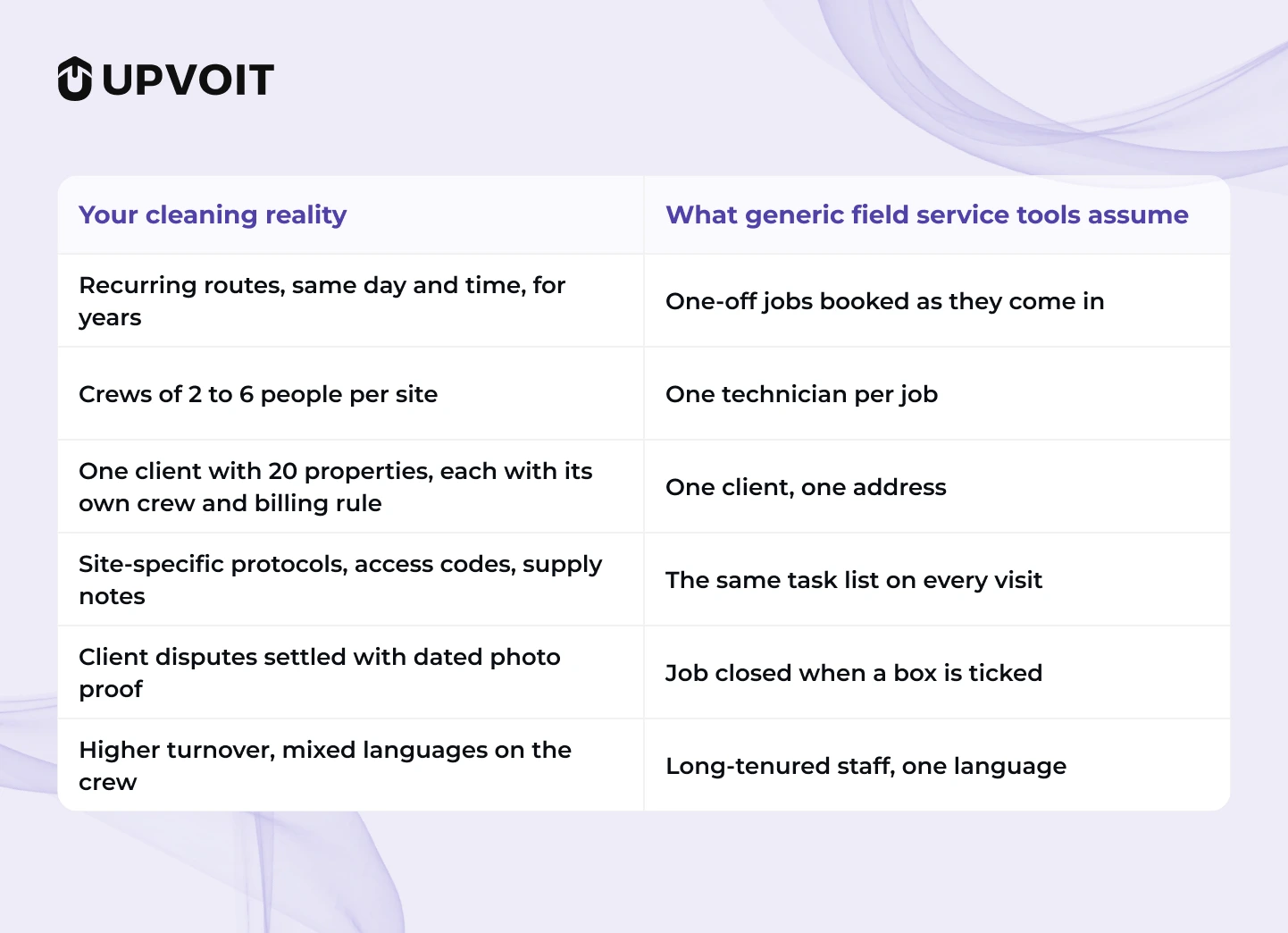
If a platform struggles with those six rows, it will fight you every week no matter how clean the calendar looks in the sales demo. It is also why a tool can demo beautifully and still feel wrong by month three.
How to choose cleaning scheduling software with a 13-point checklist
Choosing cleaning scheduling software isn’t about finding the platform with the longest feature list. It’s about finding the one that makes your day less chaotic, your team easier to manage, and your customers happier.
Because when a cleaner calls out at 7:30 AM, a client wants an update at 8:00 AM, and you’re still trying to figure out who is going where, you don’t need another dashboard. You need answers. Fast.
So don’t just watch a vendor click through a polished demo. Test the software with the problems you actually deal with.
Use this 13-point checklist during every demo. And don’t just ask whether a feature exists. Ask them to show you.
1. Recurring Schedules That Survive Real Life
Your cleaning schedule isn’t supposed to fall apart because one cleaner calls out.
Build the week once, repeat it, and then test what happens when something inevitably changes. Move one job, replace one cleaner, change one time slot, and make sure the entire crew gets the update without five phone calls and a group chat explosion.
Ask to see: A recurring route edited mid-week, live.
2. Every Job Type in One Workflow
Cleaning businesses rarely have just one type of job.
You may have recurring commercial contracts in the morning, weekly residential clients in the afternoon, a move-out clean tomorrow, and a last-minute emergency request before lunch.
Your software should handle recurring commercial contracts, residential routes, deep cleans, move-in and move-out jobs, post-construction work, and same-day requests without forcing you to create a different process for each one.
Ask to see: A one-time deep clean and a recurring contract created back to back.
3. Reassignment Measured in Seconds
Callouts happen. That’s cleaning business reality.
The question isn’t if someone will call out. It’s what happens when they do.
Strong cleaning scheduling and dispatch software should help you quickly see who’s available, who’s nearby, and who can take the job, so one callout doesn’t turn your entire morning into a scheduling emergency.
Ask to see: Three jobs reassigned from a callout scenario.
4. A Crew App Your Cleaners Will Actually Open
The best software in the world is useless if your cleaners don’t want to use it.
If the app is complicated, requires too many steps, or doesn’t support the languages your team speaks, adoption becomes another problem for you to manage.
Look for an app that’s simple to use, requires no unnecessary downloads, and supports English and Spanish so everyone is working from the same information, not from screenshots, sticky notes, and “What time was that job again?” messages.
Ask to see: The cleaner view on a phone, in both languages.
5. Offline Reliability
Not every cleaning job happens somewhere with perfect internet.
Your team may be working in basements, stairwells, remote properties, or buildings where the signal disappears exactly when you need it most.
Ask what happens when the connection drops. Do clock-ins still work? What happens to photos and job notes? When does everything sync?
Because the last thing you want is a cleaner saying, “I did clock in… I think.”
Ask to see: What happens to clock-ins, photos, and job notes with no signal, and when they sync.
6. Time Tracking Tied to the Job, Not Just the Day
Knowing that someone worked eight hours is useful.
Knowing that four of those hours went into one account that was quoted for two is much more useful.
Cleaning scheduling software with time tracking should connect hours to the specific client and job, helping you spot accounts that consistently run over budget before it’s time to renew, or before you realize you’re practically cleaning for free.
Ask to see: Hours reported by client and by job.
7. Proof of Work on Every Visit
When a client says, “Are you sure the team cleaned that?”, you shouldn’t have to start investigating like a detective.
Before-and-after photos with timestamps give you a clear record of what happened. Custom checklists for each site also help maintain quality when a substitute cleaner steps in.
The goal is simple: less arguing, less guessing, and more proof.
Ask to see: A completed job report with photos attached.
8. Site-Level Instructions That Travel With the Job
Every property has its quirks.
Maybe there’s a special access code, an alarm to disarm, a supply closet on the third floor, or a client who absolutely does not want the conference room touched.
Those details should live with the job, not inside someone’s memory or buried somewhere in a group chat from six months ago.
A cleaner covering an unfamiliar site should have what they need before they arrive.
Ask to see: A job card for a site with special access rules.
9. Multi-Site Contracts Handled as One Account
Commercial cleaning can get complicated fast.
One client might have 20 properties, different crews, different schedules, different checklists, and different billing rules.
Your software should let you manage those locations under one client account while still scheduling and tracking each property independently.
Because 20 locations should not mean 20 spreadsheets.
Ask to see: A single client with several properties, scheduled and invoiced.
10. Invoicing Triggered by Completion
Once a job is complete, billing shouldn’t require someone to copy information from one system into another.
Cleaning software with scheduling and invoicing in one system should connect the completed job directly to billing. The fewer times your team has to retype the same information, the fewer opportunities there are for mistakes.
Ideally, the final checkbox on site can send the invoice the same day.
Job completed, invoice ready. That’s how it should feel.
Ask to see: Completion to sent invoice, end to end.
11. Payroll That Reads the Same Hours
Your team already clocked the hours.
So why should someone have to type those hours into another system again?
When payroll uses the hours already tracked in the app, you reduce duplicate data entry and the dreaded monthly “Why don’t these numbers match?” exercise.
Ask to see: Tracked hours flowing into a pay run.
12. Permissions and Data Security
Not everyone on your team needs access to everything.
Cleaners should see their assigned jobs. Supervisors should see their teams. Clients should see their own locations.
And when schedules or invoices change, you should know who changed them.
Security isn’t the most exciting part of a software demo, but finding out you needed it after something goes wrong is even less exciting.
Ask to see: Permission settings and whether there is an audit trail for schedule and invoice changes.
13. Integrations, Checked Properly
“Yes, we integrate with your accounting software.”
Sounds great.
But that isn’t the question you should stop at.
Ask what data moves, in which direction, and how often.
A one-way export once a night is very different from a live two-way sync. The difference can mean hours of manual work, or almost none.
Ask to see: The actual sync with your accounting software, including direction and frequency.
Two more capabilities belong on your list even though they sit slightly outside scheduling: client visibility through automatic job updates or a portal, and reporting that shows margin per job once crew hours and travel are counted. Good cleaning service management software makes both the default rather than a task someone has to remember.
The Bottom Line
Don’t choose cleaning scheduling software because the demo looked impressive.
Choose it because your real problems became easier to handle.
Test the callout. Test the recurring schedule. Test the crew app. Test offline mode. Test the invoice. Test payroll. Test the integrations.
If the software handles the messy parts of your business, not just the easy parts on the sales demo, that’s when you know you’ve found something worth considering.
How to compare cleaning scheduling software beyond the feature list
A software demo can make almost any platform look impressive.
Every button works. Every dashboard looks clean. Every salesperson says, “Yes, we can do that.”
Then you get back to Monday morning, and you’re still moving jobs around, chasing cleaners for updates, fixing timesheets, and answering “Who is going to this property?
“That’s why comparing cleaning scheduling software shouldn’t come down to how many features a platform has. If you’re comparing different options for your cleaning business, it’s also important to look beyond feature lists and evaluate how well each platform actually fits your day-to-day operation.
For a broader comparison, see our blog to The Best Software for a Cleaning Business in 2026, Ranked by Real Operational Fit.
Instead, ask yourself three questions:
1. Does It Solve Your Biggest Daily Problems?
If scheduling changes are eating up hours every week, recurring scheduling and quick reassignment should matter more to you than a feature you’ll use twice a year.
If payroll takes hours to prepare, time tracking and payroll integration should be high on your list.
Don’t pay extra for features that look impressive. Pay for problems that actually disappear.
2. Does It Reduce Work, or Simply Move It Somewhere Else?
This is one of the easiest things to miss during a demo.
A platform might say it supports invoicing, for example. But if your team still has to export completed jobs, clean up the data, and manually enter everything into another system, the “feature” hasn’t really saved you much time.
Ask:
“What does my team still have to do manually after this feature is used?”
That question can tell you more than a feature checklist ever will.
3. Does It Work When Your Day Goes Wrong?
Don’t test software only with the perfect scenario.
Test the messy Tuesday morning.
- A cleaner calls out.
- A client changes the appointment.
- A recurring job needs to move.
- Someone arrives at a property with no signal.
- A customer asks for proof of completion.
- A completed job needs to be invoiced.
That’s the software you actually need to evaluate.
The Simplest Way to Make the Decision
Before choosing a platform, take your five most frustrating operational problems and test each one during the demo.
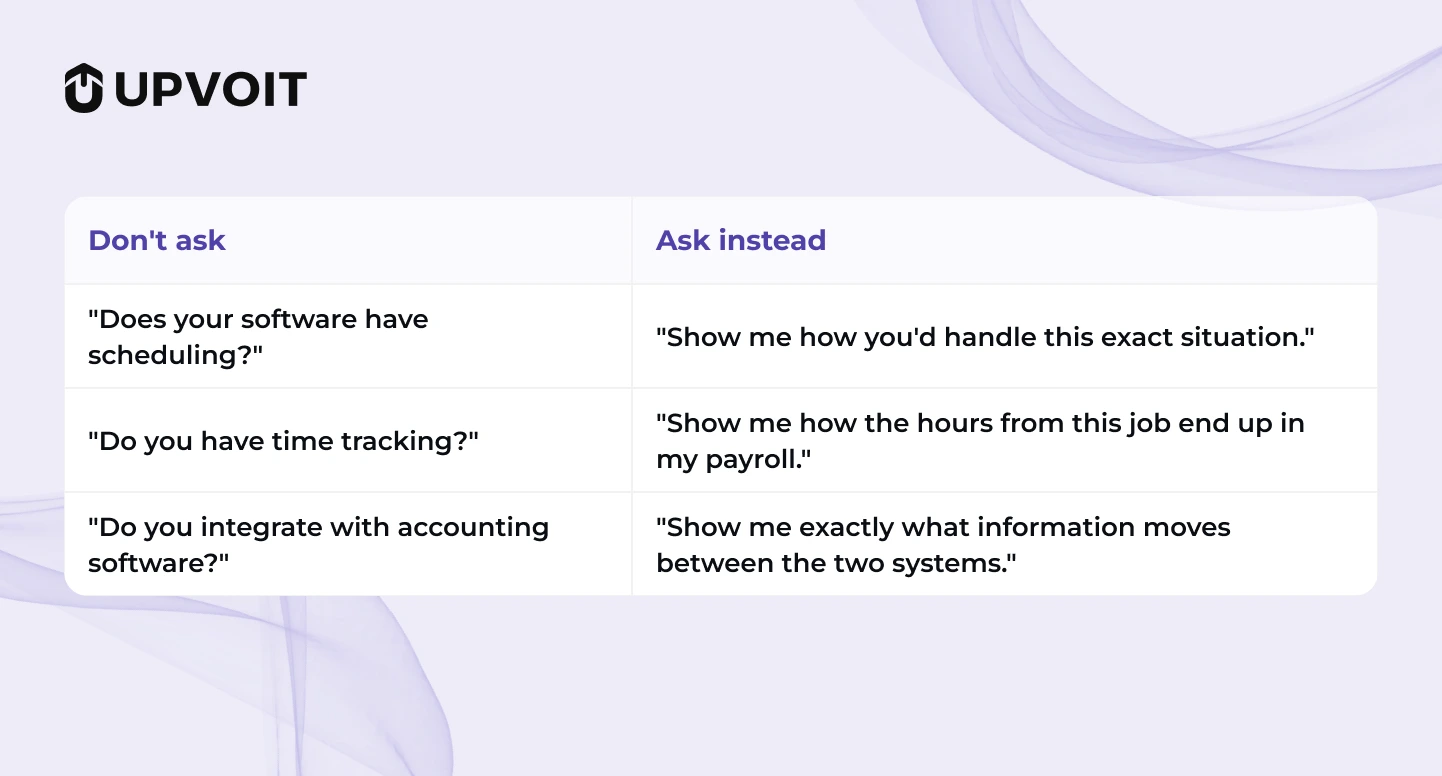
Because a feature on a website is a promise.
Seeing it solve your actual problem is evidence.
What Should Be Included Versus What Often Costs Extra
Pricing models vary widely by vendor, so treat the middle column as a set of questions to ask rather than an industry rule. The headline price rarely matches the working price, and this is where most buying decisions quietly go wrong.
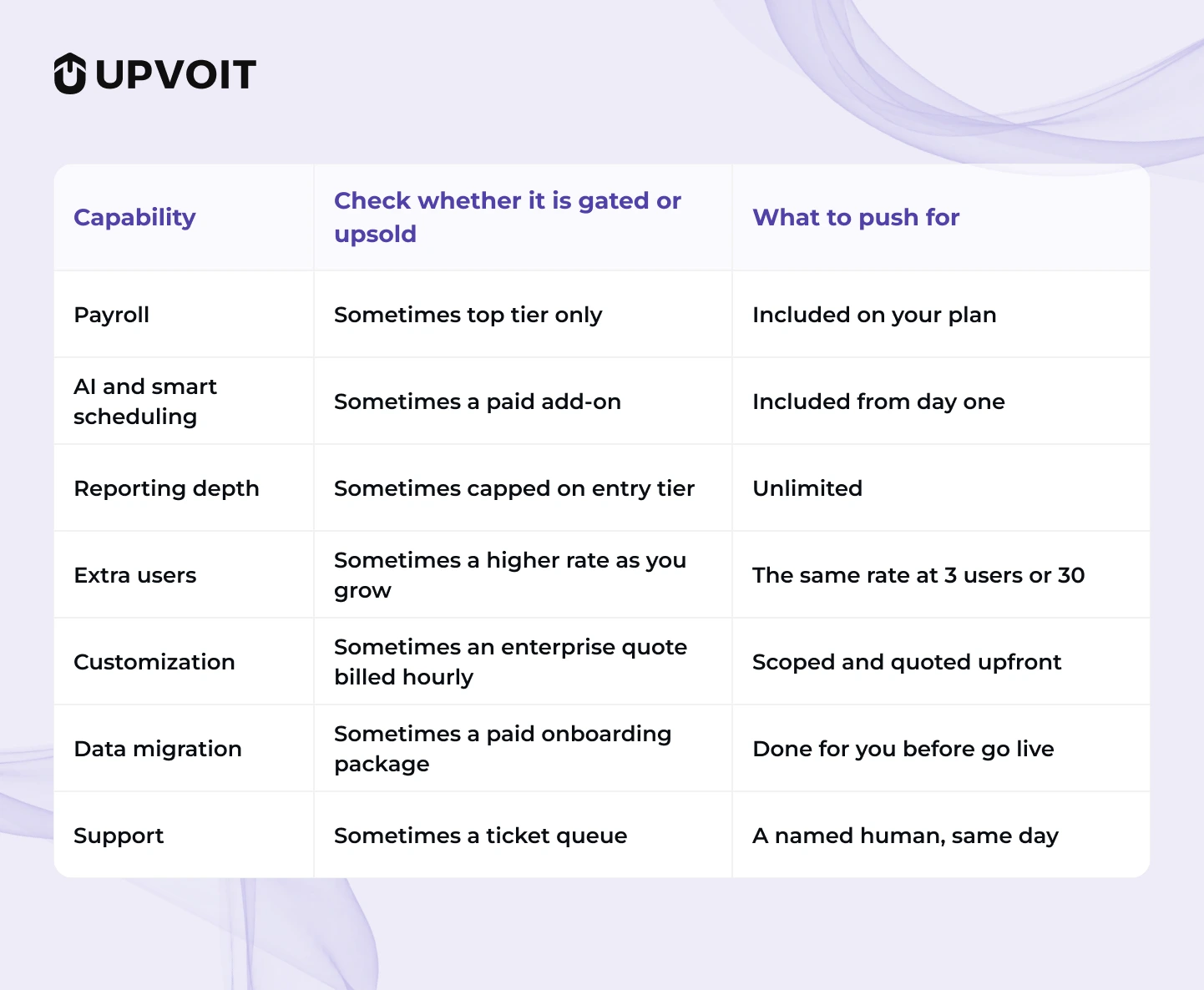
The right column is our recommendation for a growing cleaning company, not a description of the market. Run your own math at five cleaners with everything you actually need switched on. Buyers looking for the best cleaning scheduling software should price the working configuration rather than the starting tier, because the lowest advertised number is often not the lowest twelve-month cost.
Twelve Questions Worth Asking on Every Demo

Hesitation on the payroll, migration, and permissions questions usually signals a cost or a limitation you would otherwise discover after migrating.
Red Flags to Walk Away From
Some of these look minor in a demo and expensive by month three. Treat any three of them together as a reason to keep looking at other cleaning scheduling and dispatch software.
- Pricing that requires a sales call before you can see a number
- Onboarding quoted in months rather than days
- A crew app that needs installation, sign-in help, and a training session per cleaner
- Photo proof stored somewhere other than the job record
- Contracts with annual lock-in and no exit path
- Reporting that shows revenue but cannot show hours against a specific account
- Migration priced as a separate project
- No answer on what happens when the app goes offline
Pricing and what cleaning scheduling software for small businesses should look like
Small operators get squeezed in two directions. Entry tiers strip out payroll and reporting, and enterprise tiers price per module until the annual figure looks nothing like the homepage.
A fair structure for a growing cleaning company has three properties. One price per user, every feature switched on, and the same rate at three cleaners or thirty. If you’re comparing software on budget as well as operational fit, our blog to Affordable Field Service Management Software Under $50 a User, Compared breaks down how affordable field service platforms compare by user cost. That way, growth costs you seats and nothing else.
As one reference point, Upvoit currently runs a single plan at $20 per user per month billed monthly, $18 billed quarterly, or $16 billed annually. Those are Upvoit’s own published rates rather than a market benchmark, and you can check the current numbers on the pricing page. Payroll, AI tools, reporting, GPS, and support sit on the plan from day one rather than being sold as upgrades.
Where Upvoit Fits
The real question isn’t how many features a software has. It’s whether it can handle the messy, everyday problems that come with running a cleaning business.
That’s where Upvoit fits. Built for cleaning and janitorial companies, Upvoit brings scheduling, dispatch, crew tracking, time tracking, proof of work, payroll, invoicing, client communication, and reporting into one place.
When a cleaner calls out, a recurring job needs to be moved, a client wants an update, or you’re trying to figure out why a job took twice as long as expected, you shouldn’t have to jump between spreadsheets, phone calls, and different systems.
One place to manage the work. One place to see what’s happening. One less reason to chase people for answers.
Upvoit also helps connect what happens in the field to what happens in the office. Completed work can flow into invoicing, tracked hours can support payroll, and job information, photos, checklists, and client updates stay connected to the work itself.
And because changing software can feel like another project nobody asked for, Upvoit handles data migration, has a stated five-to-seven-day go-live window, and offers a 14-day free trial after the demo.
Cleaning operators have also reported fewer scheduling errors and significant admin time savings. These are customer-reported results from individual businesses, not guarantees or averages across all Upvoit customers, but they show the kind of impact the right system can have.
At the end of the day, the goal isn’t to give your team another tool to learn.
It’s to give them fewer things to chase, fewer mistakes to fix, and more time to focus on getting the job done right.
So don’t just ask Upvoit what it can do. Give it your biggest scheduling headache and see how it handles it.
FAQs
-
Can Upvoit be customized to fit my cleaning business?
Yes. Upvoit can be customized around your business workflow, so you don’t have to completely change the way your team works just to fit the software. Your scheduling, job processes, forms, checklists, and other workflows can be configured around your needs.
Whether you run residential cleaning, commercial janitorial work, or manage multiple locations, the goal is simple: the software should fit your business, not force your business to fit the software.
-
Is Upvoit affordable for a small or growing cleaning business?
Yes. Upvoit is designed to be a cost-effective field service solution, with a single plan starting at $16 per user per month on annual billing. You can also try the platform through the 14-day free trial after the demo before making a commitment.
More importantly, look beyond the monthly price. If the software saves hours of scheduling, admin, and manual data entry every week, that’s part of the value you’re actually paying for.
-
Will my cleaners actually be able to use Upvoit?
Upvoit provides a crew app that runs in a browser with nothing to download and supports English and Spanish. This makes it easier for cleaners to access schedules, job information, checklists, and other details without dealing with a complicated app.
-
What happens when a cleaner calls out at the last minute?
That’s exactly the kind of situation your scheduling software should help with. Upvoit lets you manage scheduling and dispatch from one place, helping you quickly see your team and reassign jobs without turning one callout into a morning-long scheduling headache.
-
Can Upvoit handle recurring and one-time cleaning jobs?
Yes. Upvoit supports recurring schedules and one-time jobs, allowing cleaning businesses to manage different types of work within the same system instead of creating separate processes for each job type.
-
Can Upvoit help reduce the amount of admin work my office team does?
Yes. Upvoit connects important parts of the operation, including scheduling, dispatch, time tracking, forms, payroll, invoicing, client communication, and reporting, in one platform.
That means less copying information between systems and fewer opportunities for the classic “Wait, which spreadsheet has the latest version?” problem.
-
Will I have to enter all my existing business data again?
No. Upvoit handles data migration, so your team doesn’t have to start from scratch when moving to the platform. Its published go-live window is five to seven days, depending on the setup.
-
Can Upvoit connect scheduling, time tracking, payroll, and invoicing?
Yes. Upvoit connects field operations with timesheets, payroll, invoicing, and reporting, helping reduce duplicate data entry and keeping information connected from the job site to the office.
-
Can Upvoit help me stop chasing clients for job updates?
Yes. Upvoit includes a client portal and automatic job updates, giving customers better visibility into their service and reducing the number of routine status-update calls and messages your office team has to handle.
-
How do I know if Upvoit is actually right for my cleaning business?
Don’t judge it from the feature list alone. Take one of your real operational headaches (a cleaner calling out, a recurring route changing, a client asking for proof of work, or a job taking twice as long as expected) and ask the Upvoit team to show you exactly how they would handle it.
Next Step
Take the 13-point checklist and the scorecard into your next three demos and fill them in live. The best cleaning scheduling software for your company is the one that wins on crew adoption and on the included-versus-upsold table, because that combination is what keeps it in use through 2027.
See how Upvoit handles your actual cleaning operation rather than a generic walkthrough. Bring your routes, your sites, and your crew setup, and watch scheduling, dispatch, time tracking, invoicing, and payroll run together on your own data. Book a demo.